SpringBoot整合Spring Data JPA 之多条件搜索工具类
一、OverView 在前面已经介绍过了 SpringBoot 整合 JPA 了,但是一般在公司业务中,如果出现很多次多条件搜索查询的情况,那么就会用大量冗余代码了;再结合注解的思想。本次将公共部分提取出来,并用注解的方式进行操作,可以参考前面使用注解进行 AOP 处理日志 ,也符合了 SpringBoot 的思想。
二、BaseQuery QueryWord
1
2
3
4
5
6
7
8
9
10
11
12
13
14
15
16
17
18
19
@Target(ElementType.FIELD) @Retention(RetentionPolicy.RUNTIME) public @interface QueryWord { String column () default "" ; MatchType func () default MatchType.equal ; boolean nullable () default false boolean empty () default false BetweenType type () default BetweenType.datetime ; }
注:注解类,只要在要查询的属性上加上相应的注解即可
MatchType
1
2
3
4
5
6
7
8
9
10
11
12
13
14
15
16
17
18
19
20
21
22
public enum MatchType { equal, gt, ge, lt, le, notEqual, like, notLike, between, greaterThan, greaterThanOrEqualTo, lessThan, lessThanOrEqualTo }
注:枚举类,可以对比注释进行理解
BetweenType
1
2
3
4
5
6
7
public enum BetweenType { datetime, number_long, number_integer }
注:对应上面 QueryWord中的 BetweenType ,可以对时间或数字之间的属性进行注解
BaseQuery
1
2
3
4
5
6
7
8
9
10
11
12
13
14
15
16
17
18
19
20
21
22
23
24
25
26
27
28
29
30
31
32
33
34
35
36
37
38
39
40
41
42
43
44
45
46
47
48
49
50
51
52
53
54
55
56
57
58
59
60
61
62
63
64
65
66
67
68
69
70
71
72
73
74
75
76
77
78
79
80
81
82
83
84
85
86
87
88
89
90
91
92
93
94
95
96
97
98
99
100
101
102
103
104
105
106
107
108
109
110
111
112
113
114
115
116
117
118
119
120
121
122
123
124
125
126
127
128
129
130
131
132
133
134
135
136
137
138
139
140
141
142
143
144
145
146
147
148
149
150
151
152
153
154
155
156
157
158
159
160
161
162
163
164
165
166
167
168
169
170
171
172
173
174
175
176
177
178
179
180
181
182
183
184
185
186
187
188
189
public abstract class BaseQuery <T > private int pageNum = 0 ; private int pageSize = 10 ; private static Map<Class, List<Field>> fieldCache = new HashMap<>(); public abstract Specification<T> toSpec () public Pageable toPageable () return PageRequest.of(pageNum, pageSize); } public Pageable toPageable (Sort sort) return PageRequest.of(pageNum, pageSize, sort); } protected Specification<T> toSpecWithAnd () return this .toSpecWithLogicType("and" ); } protected Specification<T> toSpecWithOr () return this .toSpecWithLogicType("or" ); } @SuppressWarnings({ "rawtypes", "unchecked" }) private Specification<T> toSpecWithLogicType (final String logicType) final BaseQuery outerThis = this ; Specification<T> specification = new Specification<T>() { @Override public Predicate toPredicate (Root<T> root, CriteriaQuery<?> query, CriteriaBuilder cb) Class clazz = outerThis.getClass(); List<Field> fields = fieldCache.get(clazz); if (fields == null ) { fields = getAllFieldsWithRoot(clazz); fieldCache.put(clazz, fields); } List<Predicate> predicates = new ArrayList<>(fields.size()); for (Field field : fields) { QueryWord qw = field.getAnnotation(QueryWord.class); if (qw == null ) { continue ; } String column = qw.column(); if (column.equals("" )) { column = field.getName(); } field.setAccessible(true ); try { Object value = field.get(outerThis); if (value == null && !qw.nullable()) { continue ; } if (value != null && String.class.isAssignableFrom(value.getClass())) { String s = (String) value; if (s.equals("" ) && !qw.empty()) { continue ; } } Path path = root.get(column); switch (qw.func()) { case equal: predicates.add(cb.equal(path, value)); break ; case like: predicates.add(cb.like(path, "%" + value + "%" )); break ; case gt: predicates.add(cb.gt(path, (Number) value)); break ; case lt: predicates.add(cb.lt(path, (Number) value)); break ; case ge: predicates.add(cb.ge(path, (Number) value)); break ; case le: predicates.add(cb.le(path, (Number) value)); break ; case notEqual: predicates.add(cb.notEqual(path, value)); break ; case notLike: predicates.add(cb.notLike(path, "%" + value + "%" )); break ; case greaterThan: predicates.add(cb.greaterThan(path, (Comparable) value)); break ; case greaterThanOrEqualTo: predicates.add(cb.greaterThanOrEqualTo(path, (Comparable) value)); break ; case lessThan: predicates.add(cb.lessThan(path, (Comparable) value)); break ; case lessThanOrEqualTo: predicates.add(cb.lessThanOrEqualTo(path, (Comparable) value)); break ; case between: switch (qw.type()) { case datetime: List<Date> dateList = (List<Date>) value; predicates.add(cb.between(path, dateList.get(0 ), dateList.get(1 ))); break ; case number_long: List<Long> longList = (List<Long>) value; predicates.add(cb.between(path, longList.get(0 ), longList.get(1 ))); break ; case number_integer: List<Integer> integerList = (List<Integer>) value; predicates.add(cb.between(path, integerList.get(0 ), integerList.get(1 ))); break ; } } } catch (Exception e) { continue ; } } Predicate p = null ; if (logicType == null || logicType.equals("" ) || logicType.equals("and" )) { p = cb.and(predicates.toArray(new Predicate[predicates.size()])); } else if (logicType.equals("or" )) { p = cb.or(predicates.toArray(new Predicate[predicates.size()])); } return p; } }; return specification; } private List<Field> getAllFieldsWithRoot (Class<?> clazz) List<Field> fieldList = new ArrayList<>(); Field[] dFields = clazz.getDeclaredFields(); if (null != dFields && dFields.length > 0 ) { fieldList.addAll(Arrays.asList(dFields)); } Class<?> superClass = clazz.getSuperclass(); if (superClass == Object.class) { return Arrays.asList(dFields); } List<Field> superFields = getAllFieldsWithRoot(superClass); if (null != superFields && !superFields.isEmpty()) { for (Field field : superFields) { if (!fieldList.contains(field)) { fieldList.add(field); } } } return fieldList; } public int getPageIndex () return pageNum; } public void setPageIndex (int pageIndex) this .pageNum = pageIndex; } public int getPageSize () return pageSize; } public void setPageSize (int pageSize) this .pageSize = pageSize; } }
注:最关键的类
所有后面要查询的类都要继承它
简单的理解:通过反射获取注解上的字段信息,构造相应的搜索条件
三、Test StudentQuery
1
2
3
4
5
6
7
8
9
10
11
12
13
14
15
public class StudentQuery extends BaseQuery @QueryWord(column = "id", func = MatchType.equal) private Long id; @QueryWord(func = MatchType.like) private String name; @Override public Specification toSpec () return super .toSpecWithOr(); } }
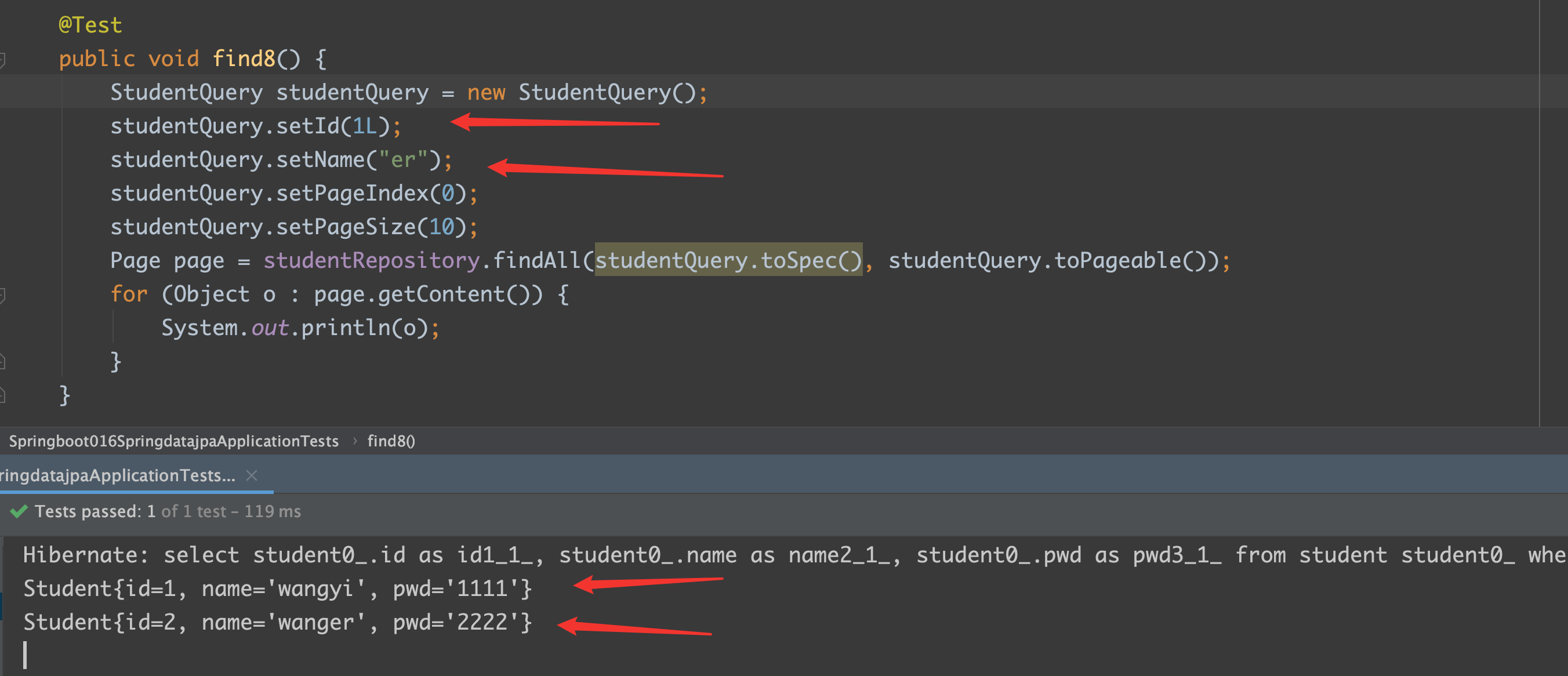
在这个查询中,使用的是 or 查询,测试类如下:
Test
1
2
3
4
5
6
7
8
9
10
11
12
@Test public void find8 () StudentQuery studentQuery = new StudentQuery(); studentQuery.setId(1L ); studentQuery.setName("er" ); studentQuery.setPageIndex(0 ); studentQuery.setPageSize(10 ); Page page = studentRepository.findAll(studentQuery.toSpec(), studentQuery.toPageable()); for (Object o : page.getContent()) { System.out.println(o); } }
注:构造的条件是 id = 1的,或者 name = ? er ? 的 student
结果
通过这个例子简单捋一下整个过程:
通过 studentQuery.toSpec() 调用父类 BaseQuery;
在 BaseQuery 中,通过反射获得打了相应注解上的字段信息;
将字段信息加到搜索条件中,进行 or 或者 and 连接
注:如果你的业务中只用了很少的条件或者只用极个别的多条件查询,可以不用这个工具类